

Optimum Gateway overlay for Obol CDVN
Opt-in Docker Compose overlay that adds the Optimum Gateway to an Obol Charon Distributed Validator Node (CDVN). The gateway peers with the beacon node on the dvnode network so blocks arrive earlier via the mump2p mesh. Charon and the validator client are unchanged.
Off by default: omit the overlay from COMPOSE_FILE and the CDVN behaves exactly as before.
Partner install, API keys, and gateway config reference: Gateway documentation (latest).
How it connects
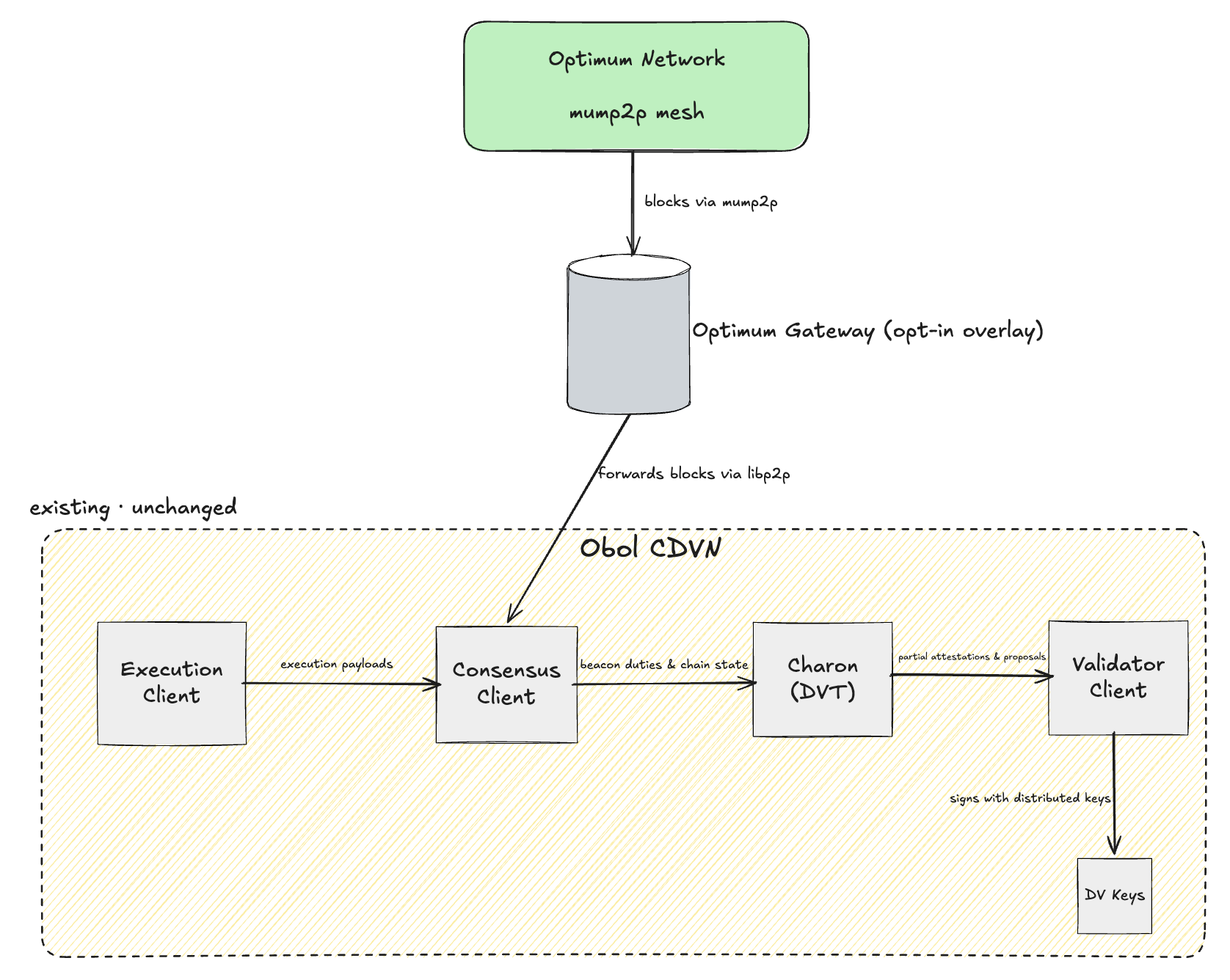
The gateway is an opt-in overlay: it receives early blocks from the Optimum mump2p mesh and forwards them to the consensus (beacon) client over libp2p. The Obol CDVN stack (execution client → consensus client → charon → validator client → DV keys) is partner-configured and unchanged. EL/CL/VC choice and charon cluster size are agnostic within supported CDVN clients.
Prerequisites
- Running CDVN on Hoodi (or mainnet) with a CL beacon node (start with Lighthouse:
CL=cl-lighthouse). - Optimum API key (
ogw_live_...) for your assignedgateway_cluster_id(Hoodi sample usesoptimum_hoodi_v0_2). curlandjqon the host (forinit-optimum.sh).
Setup
Overlay sources (browse / copy from here): github.com/getoptimum/optimum-hop/tree/main/integration/obol
From your CDVN root directory:
# 1. Copy overlay files into the CDVN tree
mkdir -p optimum
git clone --depth 1 https://github.com/getoptimum/optimum-hop.git /tmp/optimum-hop
cp -R /tmp/optimum-hop/integration/obol/. ./optimum/
rm -rf /tmp/optimum-hop

# 2. Add Optimum vars to .env (see optimum/.env.optimum.sample in that folder)
echo 'OPT_API_KEY=ogw_live_...' >> .env
echo 'GATEWAY_VERSION=v1.1.1' >> .env

# 3. Enable the overlay (append to existing COMPOSE_FILE)
# Example:
# COMPOSE_FILE=compose-el.yml:compose-cl.yml:compose-vc.yml:compose-mev.yml:docker-compose.yml:optimum/compose-optimum.yml

# 4. Start CDVN (CL must be up before init)
docker compose up -d

# 5. Write gateway config with CL peer id (Approach A)
chmod +x optimum/init-optimum.sh
./optimum/init-optimum.sh

# 6. Start (or restart) the gateway
docker compose up -d optimum-gateway
init-optimum.sh reads CL and CL_PORT_HTTP from your CDVN .env, calls GET /eth/v1/node/identity, and writes optimum/config/app_conf.yml with:
direct_cl_peers:
  - /dns4/cl-lighthouse/tcp/9000/p2p/<cl_peer_id>
No CL command edits are required (Approach A). The gateway dials the CL on the Docker dvnode network.
Verify
curl -s http://localhost:48123/health | jq '{status, checks: {cl_peers: .checks.cl_peers, mump2p_peers: .checks.mump2p_peers}}'
curl -s http://localhost:48123/api/v1/self_info | jq '{peer_id, libp2p_peers: .libp2p.total_peers, direct_peers: .libp2p.direct_peers}'

# Optional: confirm CL sees gateway (Lighthouse REST wraps peer under .data)
GW_PEER=$(curl -s http://localhost:48123/api/v1/self_info | jq -r '.peer_id')
curl -s "http://127.0.0.1:5052/eth/v1/node/peers/${GW_PEER}" | jq '.data | {state, direction}'
When connected: checks.cl_peers >= 1.
Disable
Remove :optimum/compose-optimum.yml from COMPOSE_FILE and run docker compose up -d. Stock CDVN behaviour is restored.
Supported CL clients
Any CDVN CL on P2P port 9000 and REST 5052 (cl-lighthouse, cl-lodestar, cl-teku, cl-prysm, cl-nimbus, cl-grandine). Set CL in .env before running init-optimum.sh.
Approach B (fallback)
If Hoodi validation shows the CL must explicitly trust the gateway (e.g. Lighthouse --trusted-peers / --boot-nodes), add a per-CL compose override that re-declares the CL command. See the HOP full stack in integration/ethereum/ for gateway peer discovery in that direction. Prototype Approach A first.
Files
All under integration/obol/ in this repo:
| File | Purpose |
|---|---|
compose-optimum.yml | Append to CDVN COMPOSE_FILE |
init-optimum.sh | Discover CL peer id, write app_conf.yml |
config/sample.app_conf.yml | Gateway config template |
.env.optimum.sample | Vars to add to CDVN .env |
When copied into a CDVN, paths in compose-optimum.yml expect ./optimum/config and ./optimum/identity/ relative to the CDVN root.